
What this is about#
Learning cloud and DevOps has a cost problem. The tools are paid, the infrastructure bills by the hour, and the good courses sit behind subscriptions. Plenty of people learn the concepts and never get to use the professional tooling that goes with them.
The GitHub Student Developer Pack takes much of that cost away while you’re a verified student. I have it, I use part of it, and this post covers what’s in it, how I’d pick from it as someone building toward Cloud/DevOps, and the fine print that matters before you click “activate.”
Last reviewed: September 30, 2026. Offers change, so the official links below always win.
Key point 1: GitHub Education vs. the Student Developer Pack#
These names get used interchangeably, but they’re two different things:
- GitHub Education is the program. You apply once, prove you’re a student, and GitHub verifies you.
- The Student Developer Pack is the catalog of offers you unlock after verification: GitHub’s own benefits plus dozens of partner offers.
The part people miss: verification doesn’t activate everything. Each partner offer is claimed separately, usually on the partner’s site and with its own account. Even Copilot is a separate step after approval, and GitHub notes the student benefit can take several days to finish applying. If you only see paid Copilot plans right after approval, wait. Don’t buy one.
Key point 2: What GitHub gives you directly#
| Benefit | What you get | The detail that matters |
|---|---|---|
| GitHub Pro | Free while you’re a student | A personal account plan upgrade. Many core features are already in GitHub Free (compare plans) |
| Copilot Student | Free AI coding assistant | Its own plan, not Copilot Pro: an allowance of AI credits, auto model selection only, no third-party agents (plans) |
| Codespaces | Cloud dev environments in the browser or VS Code | Up to 180 core-hours/month plus Pro-level storage (students docs) |
Two of these need more explanation.

Codespaces: core-hours, not hours. The banner above says “hours,” but the documentation counts core-hours, and usage is multiplied by machine size. On a 2-core machine, 180 core-hours is about 90 hours of running time a month; on a 4-core machine, about 45. Storage is billed separately, for as long as a codespace exists, not only while it’s running (billing docs). Delete the codespaces you’re done with.
Copilot Student: useful, but it isn’t a free Copilot Pro. You can’t pick models manually, and the chat and agent usage depends on your credit allowance. GitHub also rechecks your student eligibility every month.
Key point 3: Partner benefits along a learner’s path#
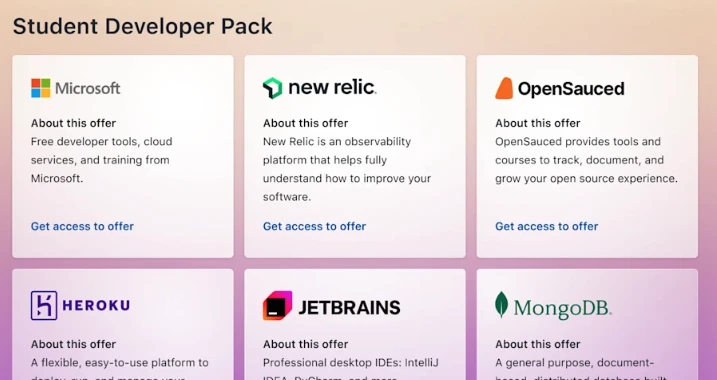
The Pack page lists offers by partner, which makes it hard to see what you’d actually use. I find it more useful to map them to the path any small project goes through:
flowchart TD
    A["Code
JetBrains · Termius"] --> B["Environment
Codespaces"]
    B --> C["Deploy
Azure · Heroku"]
    C --> D["Data
MongoDB Atlas"]
    D --> E["Observe
Datadog · New Relic"]
    E --> F["Publish
Namecheap .me domain"]
    S["Secrets
Doppler · 1Password"] -.-> C
    L["Learn
Frontend Masters · Educative · DataCamp"] -.-> A
    style F fill:#1f6f43,stroke:#3fb950,color:#fff
What each stage offers, quoted from the Pack catalog as of today:
- Cloud: Microsoft Azure gives “25+ Microsoft Azure cloud services plus $100 in Azure credit” (ages 18+). Heroku gives a "$13 USD per month for 24 months" credit.
- Data: MongoDB gives "$50 in MongoDB Atlas Credits", plus Compass and MongoDB University.
- Observability (seeing what your running app and infrastructure are doing): Datadog Pro “including 10 servers. Free for 2 years”, and New Relic free while you’re a student.
- Secrets: Doppler Team free while you’re a student, and 1Password free for a year, including its developer tools.
- Developer tools: JetBrains IDEs (renewed annually) and Termius Pro, an SSH client, while you’re a student.
- Domains: Namecheap gives “1 year domain name registration on the .me TLD” plus an SSL certificate for a year.
- Learning: Frontend Masters and Educative for 6 months each, and DataCamp for 3 months.
That list is a curated slice, not the whole catalog. The full catalog is long, and trying to claim everything is how you end up with twelve accounts and zero projects.
Key point 4: Where I’d start, depending on your goal#
Pick two or three benefits that fit the next thing you want to learn, and ignore the rest until you need them.
flowchart TD
    Q{What do you want
to learn next?} --> A[Cloud & infrastructure]
    Q --> B[Backend & data]
    Q --> C[A public portfolio]
    A --> A1["Azure credit + Codespaces
+ Datadog to watch it run"]
    B --> B1["Heroku credit + MongoDB Atlas
+ Copilot Student"]
    C --> C1["Namecheap .me domain
+ GitHub Pages + Copilot Student"]
The order matters. Learn a concept, build something small, deploy it, watch it run, then write it up. Access to a tool isn’t evidence of skill. A repo that shows what you built with it is.
Key point 5: What I actually use#
To be clear about my own usage: I use two benefits from the Pack.
- Copilot Student. I use it in VS Code, my main editor. It speeds up the boring parts, but I still read every suggestion before accepting it. It’s a helper, not a substitute for understanding the code.
- The Namecheap .me domain. The domain for this site, https://rochanewton.me, came from the Pack’s free year of .me registration. That’s the first lesson from the “check the terms” section: the free part is one year. Next year’s renewal is at the regular price, and that’s on me.
Everything else in this post is described from the official terms, not from hands-on testing. When I use any of it for my cloud lab, it’ll get its own post.
Key point 6: Check these before you activate anything#
The Pack mixes four kinds of value, and they behave differently:
- Included usage (Codespaces core-hours): resets monthly, and it gets blocked when you run out if you have no payment method on file.
- Credits (Azure, Heroku, MongoDB): a fixed amount. Once they’re used up or expire, you pay or stop.
- Time-limited subscriptions (Datadog, 1Password, the courses): free for a set period, then renewal pricing.
- While-verified benefits (GitHub Pro, Copilot Student, Termius, Doppler): last as long as your student status does.
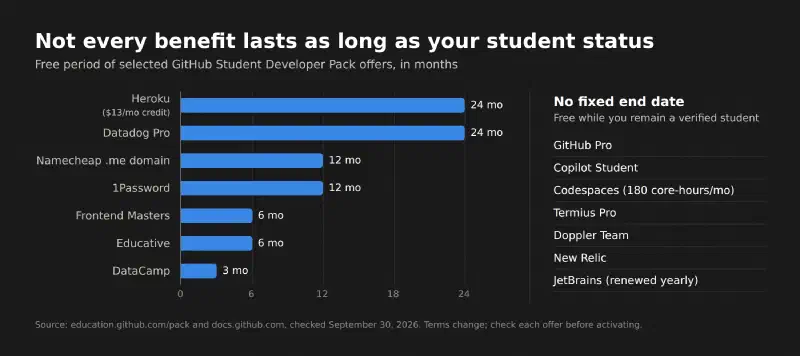
Before each activation, check: duration and redemption deadlines, whether a credit card is required, age or region limits (Azure is 18+), usage caps, and what it costs after the free period. Timing matters most for the short offers. Claim them when you have a project ready for them.
How to apply#
Per the official application guide, you need to be at least 13, be enrolled in a degree- or diploma-granting program, and have a personal GitHub account. You’ll prove enrollment with something like a dated school ID, class schedule, transcript or enrollment letter. Depending on your school, you may need to use an academic email.
Start from your account’s Education benefits settings, submit the application, wait for verification, and then activate the benefits you picked. GitHub doesn’t promise a processing time, so don’t plan around one.
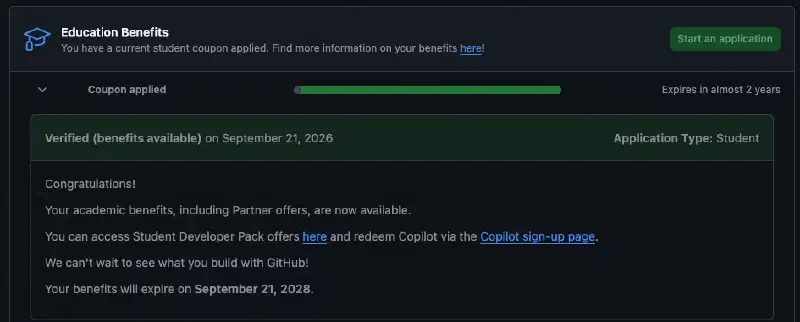
This is what approval looked like on my account. Two details are worth noticing: Copilot is redeemed on its own sign-up page, and the benefits come with an expiry date.
Quick FAQ#
Do I lose everything when I graduate? The while-verified benefits end when you’re no longer a student, and verification itself has an expiry date shown in your Education benefits settings (mine runs for two years). Fixed-term offers you already claimed follow their own terms, so read each one.
Is Codespaces unlimited? No. You get 180 core-hours a month plus a storage allowance, and usage is blocked when you hit the limit if you have no payment method on file.
Does the Pack cost anything? Applying and the benefits themselves are free. Renewals, overages and anything past a credit’s limit are not.
Conclusion#
The Student Developer Pack is one program with two layers: GitHub’s own benefits (Pro, Copilot Student, and 180 core-hours of Codespaces) and a large set of partner offers for cloud, data, observability, secrets, domains and learning. The value comes from choosing two or three that match your next learning goal and activating them when you’re ready to use them. Mind the fine print: core-hours aren’t hours, credits run out, and a free domain year ends with a renewal bill.
Explore the official Student Developer Pack, check your eligibility, and pick the benefits that match what you’re learning next. Which category would help your studies most: cloud, developer tools, or learning platforms?
Sources#
- GitHub Student Developer Pack: partner offers and terms
- About GitHub Education for students: Copilot and Codespaces entitlements
- Plans for GitHub Copilot: Copilot Student vs. other plans
This post is an independent overview, not an official GitHub publication. Claude helped research the official terms, structure the post and draft it. The Cloud/DevOps framing, my own usage notes and the final review are mine.
Where this fits#
Part 1 of GitHub in Practice, a new series on using GitHub’s tools in real learning and Cloud/DevOps work.