
What this is about#
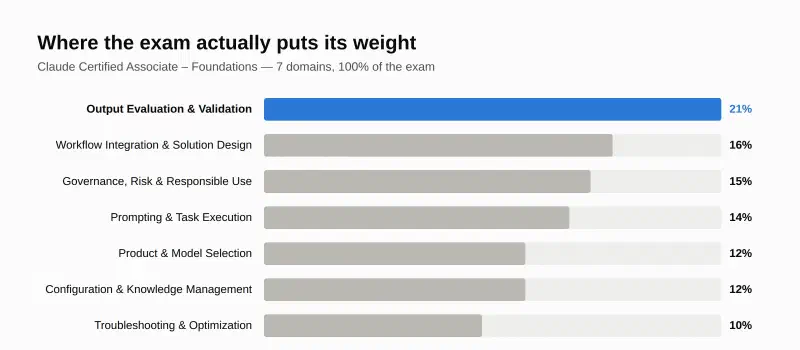
Domain 6 of the Claude Certified Associate – Foundations exam is Configuration and Knowledge Management. It’s worth 12%. The line it draws: using Claude means typing a good prompt today. Operating Claude means building an environment where the right context, instructions, and procedures already exist, so every conversation starts from a configured baseline instead of a blank slate. Configuration is leverage — set it up once, benefit on every conversation that follows — and it’s also what turns individual skill into team capability, since two people asking the same question against the same configured Project get the same quality of answer.
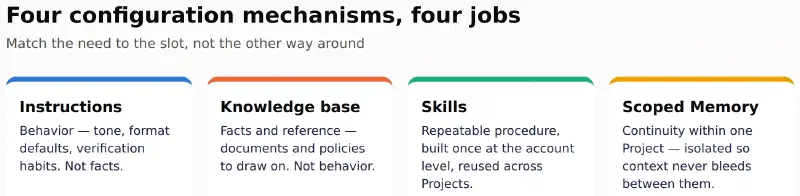
Key point 1: four mechanisms, four different jobs#
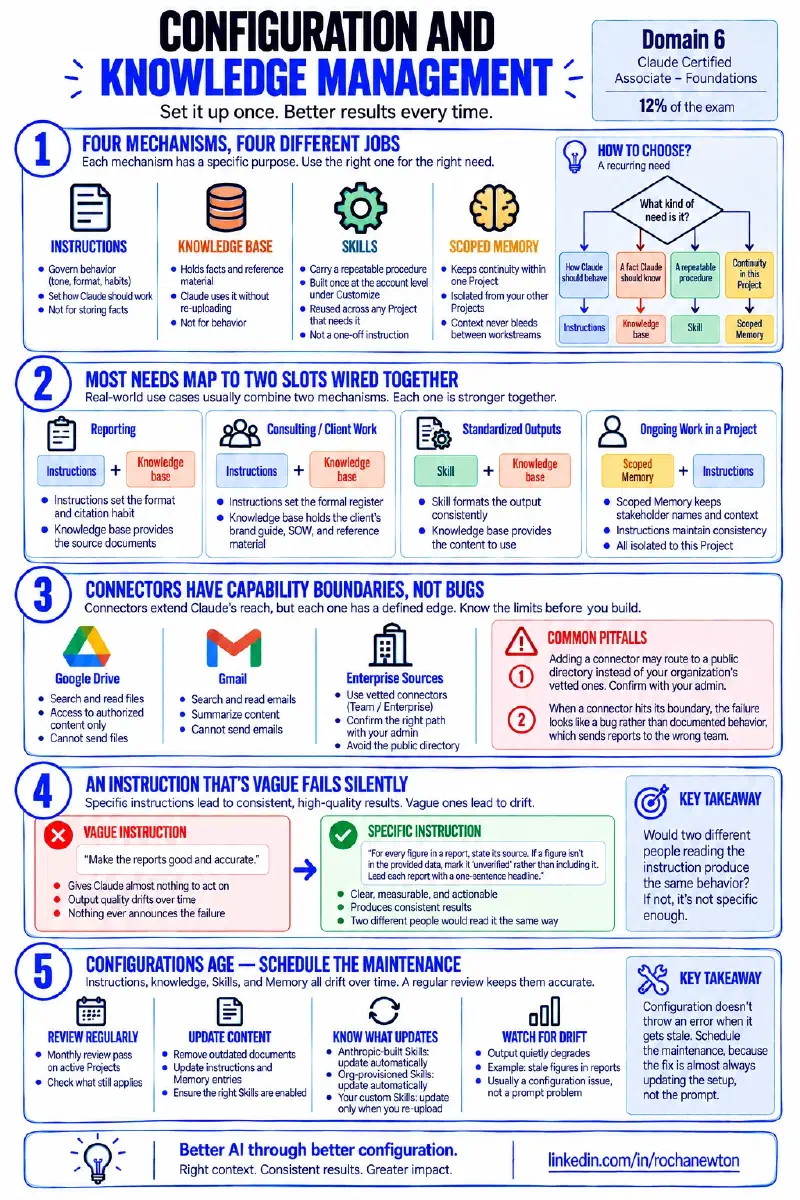
Instructions govern behavior — tone, format defaults, verification habits — not facts. The knowledge base holds facts and reference material Claude should draw on without re-uploading — not behavior. Skills carry a repeatable procedure, built once at the account level under Customize and reused across any Project that needs it — not a one-off instruction. Scoped Memory keeps continuity within one Project, isolated from your other Projects so context never bleeds between workstreams.
flowchart TD
    A[A recurring need] --> B{What kind of
need is it?}
    B -->|How Claude should behave| C[Instructions]
    B -->|A fact Claude should know| D[Knowledge base]
    B -->|A repeatable multi-step procedure| E[Skill]
    B -->|Continuity within this Project| F[Scoped Memory]

    style C fill:#2a78d6,stroke:#1c5cab,color:#fff
    style D fill:#eb6834,stroke:#c14e22,color:#fff
    style E fill:#1baf7a,stroke:#0d8a5c,color:#fff
    style F fill:#eda100,stroke:#c98500,color:#fff
Key point 2: most needs map to two slots wired together#
The cleanest configurations rarely fit one mechanism alone. “Always cite the source document for factual claims” is a standing instruction, but the documents it cites live in the knowledge base — neither works without the other. A consultant running one Project per client pairs the same way: standing instructions set the formal register and citation habit, the knowledge base holds the client’s brand guide and current statement of work, an account-level Skill formats every status report the same way, and scoped Memory holds that client’s stakeholder names — kept out of every other client’s Project entirely.
Key point 3: connectors have capability boundaries, not bugs#
A connector — Google Drive, Gmail — extends Claude’s reach into data you authorize, and each one has a defined edge. A mail connector that can search and read but not send isn’t broken; it’s at its boundary. Two pitfalls show up often in the field: the obvious “add a connector” path can route to a public directory instead of your organization’s vetted ones, so confirm the right path with your admin on Team or Enterprise; and when a connector hits its boundary, the failure looks like a bug rather than documented behavior, which sends reports to the wrong team and stalls the fix. Knowing each connector’s edge before you build a workflow on it avoids both.
Key point 4: an instruction that’s vague fails silently#
“Make the reports good and accurate” gives Claude almost nothing to act on — output quality drifts conversation to conversation and nothing ever announces the failure. “For every figure in a report, state its source. If a figure isn’t in the provided data, mark it ‘unverified’ rather than including it. Lead each report with a one-sentence headline” is precise enough to actually change output, consistently. The test for any standing instruction: would two different people reading it produce the same behavior?
Key point 5: configurations age — schedule the maintenance#
Instructions, knowledge, Skills, and Memory all drift toward stale, and none of them throw an error when they do — output just quietly degrades. A monthly review pass on active Projects catches most of it: do the standing instructions still match the current process, is the knowledge base free of superseded documents, are the right Skills enabled. Anthropic-built and org-provisioned Skills update automatically; your own custom Skills only change when you re-upload them. A recurring report Project drifting on stale figures is a textbook case — the knowledge base already had the current targets, but the standing instruction and a Memory entry still pointed at last year’s template. The fix was updating those two, not writing a better prompt.
Conclusion#
Domain 6 in one pass: match each recurring need to the right mechanism — instructions for behavior, knowledge for facts, Skills for procedure, scoped Memory for continuity — and expect most real needs to wire two of them together. Know each connector’s capability boundary before building on it. Write instructions precise enough that two people would read them the same way. And schedule maintenance, because configuration decays silently and the fix is almost always updating the setup, not the prompt.
Sources#
- Configuration & Knowledge Management — Anthropic Partner Academy
- Claude Certified Associate – Foundations Exam Guide — official PDF
Where this fits#
Part 8 of Getting Claude Certified. Part 1 covered the 4D Framework, Part 2 covered Chat, Projects, Artifacts, and Research, Part 3 covered Domain 1 — Output Evaluation and Validation, Part 4 covered Domain 2 — Workflow Integration and Solution Design, Part 5 covered Domain 3 — Governance, Risk, and Responsible Use, Part 6 covered Domain 4 — Prompting and Task Execution, Part 7 covered Domain 5 — Product and Model Selection. Part 9 covered Domain 7 — Troubleshooting and Optimization — that closes out all 7 exam domains.