
What this is about#
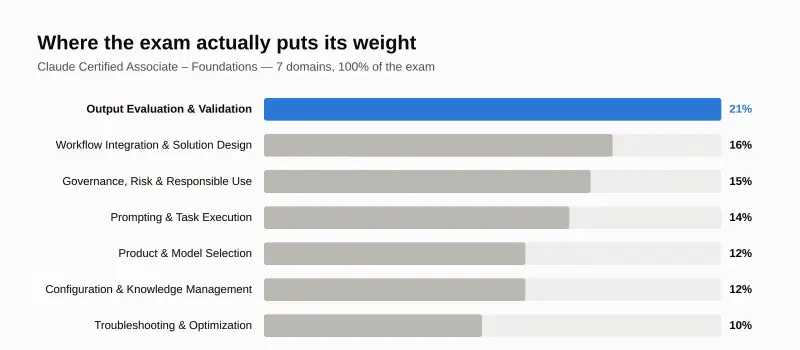
Domain 2 of the Claude Certified Associate – Foundations exam is Workflow Integration and Solution Design. It’s worth 16% — second only to Output Evaluation, which Part 3 already covered. Where that domain asked “is this one output good?”, this one asks a different question entirely: where does Claude actually belong in a workflow made of multiple steps, systems, and people — and where doesn’t it? Getting an individual answer right doesn’t matter much if you’ve wired it into the wrong place in the process.
Domain weight#
Key point 1: three interaction patterns, not one#
Claude fits into a solution three different ways, and each carries a different cost and a different amount of oversight it needs: augmented calls, where a human runs each step and Claude assists one call at a time; workflows, where Claude runs a fixed, predictable sequence of steps on its own; and agents, where Claude plans its own steps to reach a goal. Autonomy goes up at each stage — and so does the cost of it going wrong unsupervised.
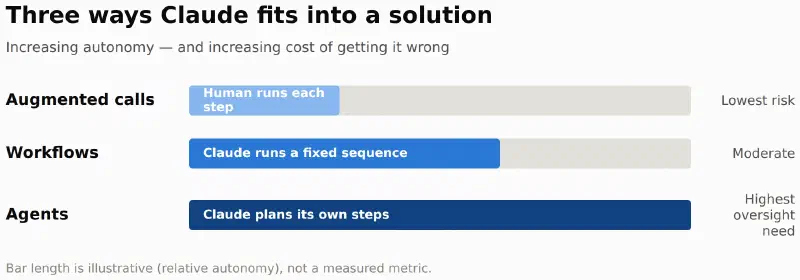
Picking between the three comes down to two questions: does the task need more than one step, and does it need Claude to decide the steps itself?
flowchart TD
    A[New task] --> B{More than
one step?}
    B -->|No| C[Augmented call
human runs it, Claude assists]
    B -->|Yes| D{Steps are fixed
and predictable?}
    D -->|Yes| E[Workflow
Claude runs the fixed sequence]
    D -->|No, Claude needs to
decide the steps| F[Agent
Claude plans and adapts as it goes]

    style C fill:#86b6ef,stroke:#5598e7,color:#0b0b0b
    style E fill:#2a78d6,stroke:#1c5cab,color:#fff
    style F fill:#104281,stroke:#0d366b,color:#fff
Each step down this tree trades predictability for reach — an agent can handle a task nobody scripted in advance, but it also needs the most oversight to catch when its own plan goes wrong.
Key point 2: decompose the requirement before picking a pattern#
Before choosing a pattern, split the problem into three ownership questions: what’s Claude’s job, what’s the existing system’s job, and what’s the human’s job. Skipping this step is how a task that should’ve been a single augmented call ends up over-engineered as an agent, or how a genuinely multi-step process gets crammed into one long prompt because nobody separated “what Claude does” from “what the database already does.”
Key point 3: reference architecture — retrieval vs. live-state#
Once Claude’s role is scoped, the next design decision is how it reaches information: retrieval, pulling from indexed or stored content that doesn’t need to be current to the second, or live-state integration, calling a live system or API when the answer has to reflect what’s true right now. Pricing, inventory, and account balances need live-state. A knowledge base answer about a policy from last quarter usually doesn’t.
Key point 4: picking the entry point#
Claude shows up through several doors — Claude.ai, the API, SDKs, Claude Code, MCP servers — and each one is the right layer for a different kind of customization. Claude.ai is the user-facing interface for people working directly with Claude. The API and SDKs are the build-time engineering layer for embedding Claude into your own product. MCP servers are how Claude reaches external tools and data without custom integration code for each one. Picking the wrong entry point means re-solving a problem the platform already solved at a different layer.
Key point 5: communicating value and limits to stakeholders#
The last piece of this domain isn’t technical at all: being able to explain to a stakeholder what Claude will actually do, what it won’t, and where a human still has to be involved — before the solution ships, not after it disappoints someone. A solution nobody trusts because nobody explained its limits up front fails for a reason that had nothing to do with the model.
Conclusion#
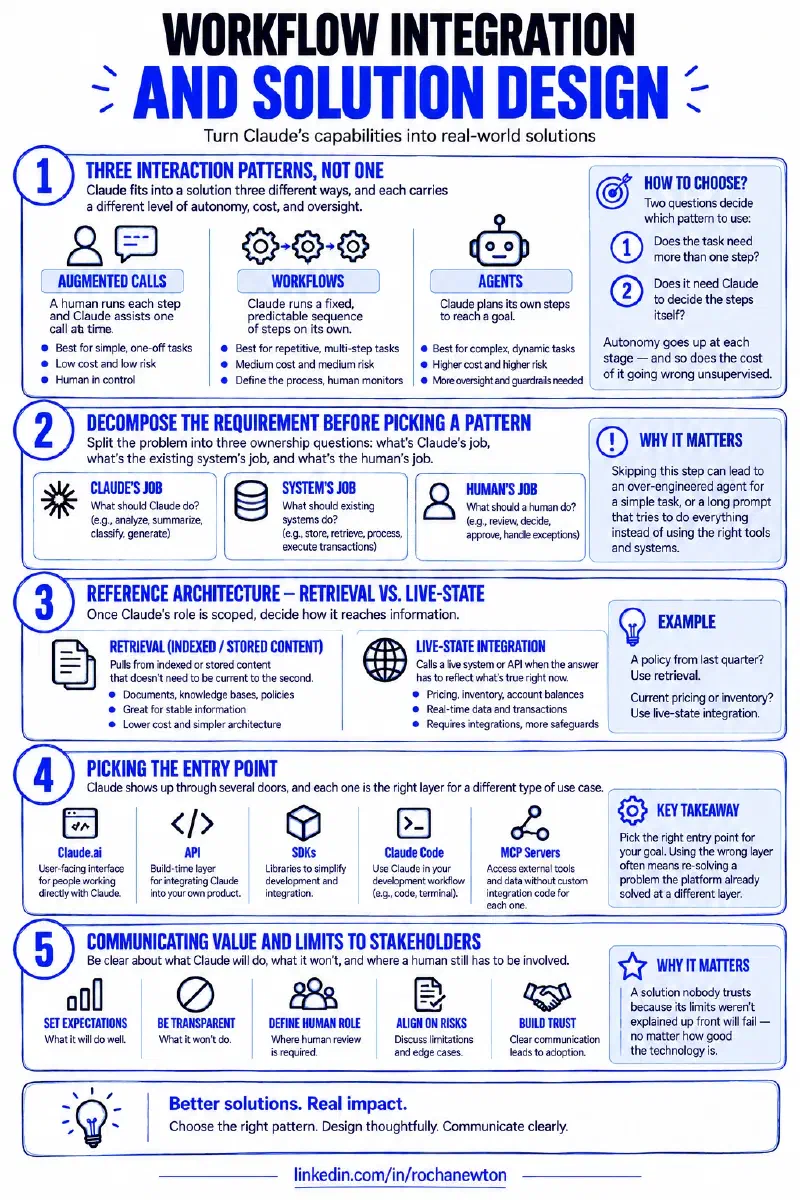
Domain 2 comes down to this: pick the interaction pattern that matches how much autonomy the task actually needs (augmented call, workflow, or agent), decompose the requirement so Claude, the existing system, and the human each own a clear piece, choose retrieval or live-state based on whether the answer needs to be current, pick the platform entry point that matches the kind of customization the job needs, and be straight with stakeholders about what the solution will and won’t do. That’s solution design — the layer above any single good output.
Sources#
- Claude Platform & Solution Design — Anthropic Partner Academy
- Claude Certified Associate – Foundations Exam Guide — official PDF
Where this fits#
Part 4 of Getting Claude Certified. Part 1 covered the 4D Framework, Part 2 covered Chat, Projects, Artifacts, and Research, Part 3 covered Domain 1 — Output Evaluation and Validation. Part 5 takes on Domain 3 — Governance, Risk, and Responsible Use.