
What this is about#
Domain 1 of the Claude Certified Associate – Foundations exam is Output Evaluation and Validation. It’s worth 21% — more than any other domain on the exam. The whole domain comes down to one idea: good-looking output is not the same thing as validated output. Fluent, confident text doesn’t tell you anything about whether it’s actually correct. This post breaks down the framework for closing that gap, on purpose, instead of by accident.
Why this domain gets more weight than any other#
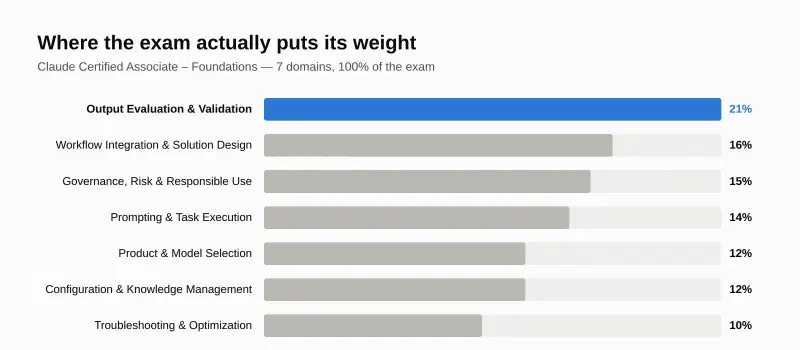
A quick snapshot of the exam itself, from Anthropic’s official exam guide:
| Length | 120 minutes |
| Questions | 60 |
| Price | $99 USD |
| Passing score | 720 (scaled 100–1,000) |
Key point 1: check output against three references, not one#
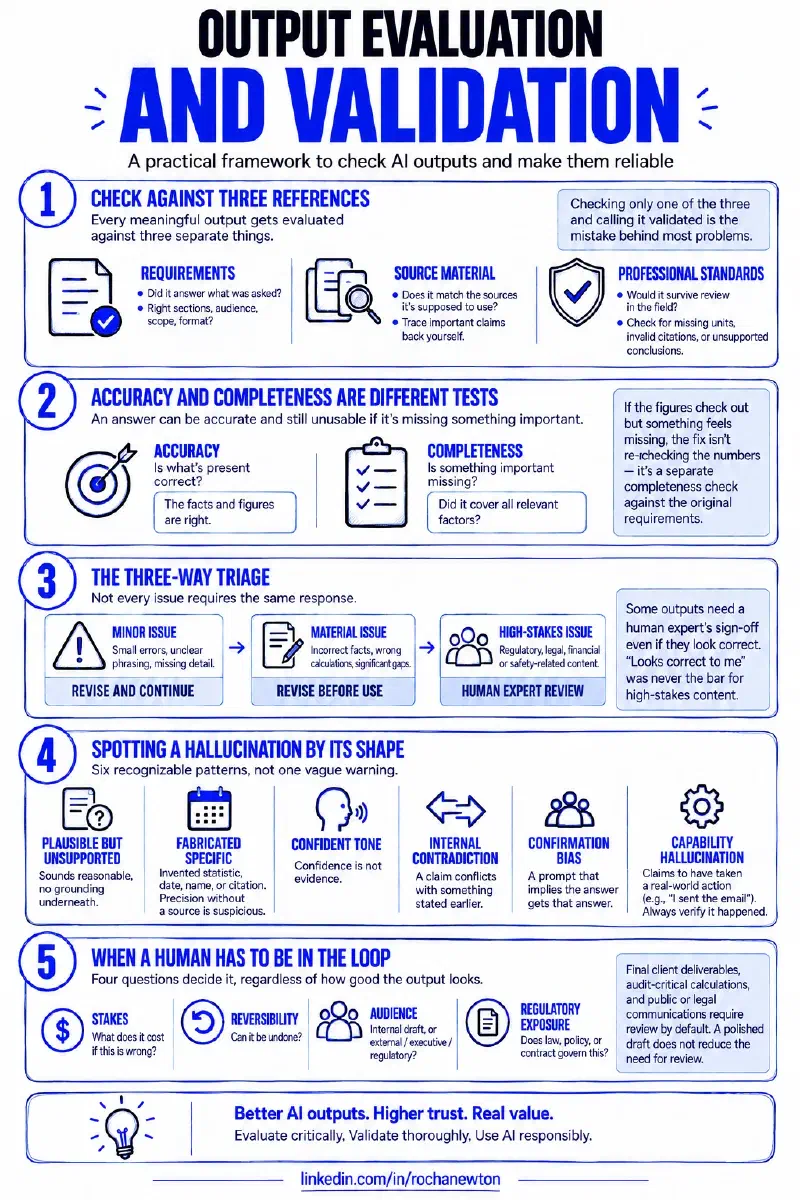
Every meaningful output gets evaluated against three separate things:
- Requirements — did it answer what was actually asked? Right sections, right audience, right scope, right format.
- Source material — does it match what it’s supposed to be drawing from? Don’t assume Claude “read it correctly” — trace important claims back yourself.
- Professional standards — would it survive review in the field it’s going into? A number with no units, a citation nobody can find, a conclusion nothing supports — these pass a casual read and fail a real one.
Checking only one of the three and calling it validated is the mistake behind most of what follows.
Key point 2: accuracy and completeness are different tests#
Accuracy asks: is what’s present correct? Completeness asks: is something important missing? An answer can be fully accurate and still unusable because it left out a factor that mattered. If the figures all check out but something feels missing, the fix isn’t re-checking the numbers again — it’s running a separate completeness check against the original requirements.
Key point 3: the three-way triage#
Every output lands in one of three buckets:
flowchart TD
    A[Output produced] --> B{Requirements met?
Source checks pass?
Professional standard OK?}
    B -->|Yes, risk acceptable| C[Ready to use]
    B -->|Specific, correctable gap| D[Needs revision]
    B -->|Stakes, regulatory exposure,
or accountability requires it| E[Needs human override]
    D -->|Fix and re-check| B
    E -->|Human decides,
regardless of output quality| F[Human review]

    style C fill:#1baf7a,stroke:#0d8a5c,color:#fff
    style D fill:#eda100,stroke:#c98500,color:#fff
    style E fill:#e34948,stroke:#c73b3a,color:#fff
The distinction that matters is between the last two boxes. A wrong subtotal needs revision — fix it, move on. A regulatory interpretation headed for an actual filing needs a human expert’s sign-off even if it looks completely correct to you, because “looks correct to me” was never the bar for that category of output.
Key point 4: spotting a hallucination by its shape#
Six recognizable patterns, not one vague warning:
- Plausible-but-unsupported claim — sounds reasonable, no grounding underneath
- Fabricated specific — an invented statistic, date, name, or citation. Precision without a source is suspicious, not reassuring
- Confident tone masking uncertainty — confidence is not evidence
- Internal contradiction — a number or assumption stated early conflicts with one stated later
- Confirmation bias in framing — a prompt that implies the answer gets that answer
- Capability hallucination — Claude says “I sent the email” or “I saved the file” when no tool that could do that was actually available. Always verify the action happened
Key point 5: when a human has to be in the loop#
Four questions decide it, regardless of how good the output looks:
- Stakes — what does it cost if this is wrong?
- Reversibility — can it be undone?
- Audience — internal draft, or external / executive / regulatory?
- Regulatory exposure — does law, policy, or contract govern this?
Final client deliverables, audit-critical calculations, and public or legal communications sit in “review required” territory by default. A polished draft does not reduce the need for review — if anything, polish is what gets something waved through without one.
A few more checks worth knowing#
- Code Execution computes, it doesn’t validate logic. Use it for totals, projections, and anything that needs to be calculated rather than estimated — but a computed result still isn’t automatically correct methodology.
- Input curation is part of validation, not prep. Noisy, contradictory source material produces noisy output. A bigger model doesn’t fix that — de-duplicating and labeling your sources does.
- Same facts, different delivery. An executive wants the decision and the impact first. A working team wants the method and the owner. An external audience needs controlled disclosure. Sending the same raw draft to all three fails at least two of them.
Conclusion#
Domain 1 is the highest-weighted section of the Claude certification exam because evaluation is the actual skill — not prompting, not workflow design. The short version: check output against requirements, source, and professional standard; treat accuracy and completeness as separate tests; triage into ready / needs revision / needs a human; know the six hallucination patterns; and know the four questions that force human review no matter how good the output looks. That’s the whole domain, and it’s the part of working with Claude that pays off the most.
Sources#
- Claude Certified Associate – Foundations Exam Guide — official PDF
- Claude Certified Associate – Foundations Prep Course — “Evaluating & Validating Claude’s Output” module
Where this fits#
Part 3 of Getting Claude Certified. Part 1 covered the 4D Framework, Part 2 covered Chat, Projects, Artifacts, and Research. Part 4 takes on Domain 2 — Workflow Integration and Solution Design.