

What this is about#
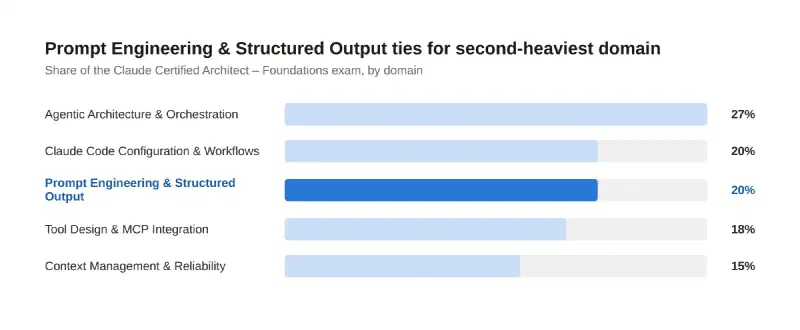
Domain 4 — Prompt Engineering & Structured Output — ties Claude Code Configuration & Workflows for second-heaviest domain on the Claude Certified Architect – Foundations exam, at 20%. Its six task areas move from how you write a prompt to how you guarantee what comes back is actually usable: explicit criteria, few-shot examples, schema-enforced output, validation loops, multi-instance review, and batch processing for scale.
Key point 1: explicit criteria beat vague instructions, every time#
Claude’s own prompting docs frame this well: treat Claude like a brilliant but new employee who has no context on your norms. “Review this code” leaves Claude guessing what counts as worth flagging. “Report security vulnerabilities and logic errors; skip style preferences” doesn’t. The architect-level version of this shows up in things like severity classification — giving Claude concrete criteria for what’s critical versus minor, with actual code examples of each — rather than trusting it to calibrate severity from a one-line instruction. The test the docs suggest: show your prompt to a colleague with minimal context and see if they’d know exactly what to do. If they’d be confused, so will Claude.
Key point 2: a handful of good examples beats a page of description#
Few-shot (multishot) prompting is one of the most reliable ways to steer output format, tone, and structure — Claude generalizes from concrete examples far more reliably than from abstract rules. For extraction tasks specifically, where source documents vary in structure, 2-4 well-chosen examples covering the ambiguous or edge-case scenarios do more to reduce hallucination than a longer written specification would. The examples have to earn their place, though: relevant (close to your real use case), diverse (covering edge cases so Claude doesn’t lock onto an unintended pattern), and clearly marked off from the rest of the prompt (Claude’s docs recommend wrapping them in <example> tags so they read as demonstrations, not instructions).
Key point 3: tool use with JSON schemas is how you guarantee the shape of the output#
Asking nicely for JSON in a text prompt gets you JSON most of the time. Tool use with a JSON schema — especially with strict: true — gets you schema-compliant output through constrained decoding, which is a materially different guarantee: no parsing errors, no retries for a malformed shape. tool_choice gives you the dial on top of that: auto lets Claude decide whether to call the tool, any guarantees some tool gets called, and a forced choice pins it to one specific tool. The detail worth internalizing for real-world extraction: when source documents might not contain every field, design those fields as optional in the schema (leave them out of required) rather than forcing Claude to fabricate a value just to satisfy the schema.
Key point 4: when validation fails, feed the failure back — don’t just retry blind#
A retry that resends the identical prompt after a validation failure wastes a call and often reproduces the same mistake. The stronger pattern appends the specific validation error to the prompt on retry, so Claude sees exactly what was wrong and can correct it directly rather than guessing again from scratch. Part of designing this well is distinguishing semantic errors (the data’s wrong — a field has an implausible value) from syntax errors (the shape’s wrong — malformed JSON, a missing required key): they call for different feedback and, at scale, tracking which error types recur tells you where the schema or prompt itself needs to change, not just the retry logic.
flowchart LR
    A[Generate output] --> B{Passes validation?}
    B -->|Yes| C[Accept]
    B -->|No| D[Append specific error
to prompt]
    D --> A

    style C fill:#28c840,stroke:#1c9c30,color:#fff
    style D fill:#2a78d6,stroke:#1c5cab,color:#fff
Key point 5: a model reviewing its own output is a weaker check than a fresh instance reviewing it#
Self-review has a structural limitation: the model still holds the context from generating the thing it’s now reviewing, which makes it less likely to question its own choices — it’s primed to confirm, not interrogate. An independent review instance, with no memory of having written the work, catches subtler issues more reliably because it has nothing invested in the original approach. For large reviews, the same idea scales into multi-pass review: split the work into a local pass (checking each piece on its own) and a separate cross-file or integration pass (checking how the pieces fit together), rather than expecting one pass to catch both kinds of problems at once.
A quick note on scale: batch processing for latency-tolerant workloads#
Rounding out the domain: the Message Batches API trades immediacy for cost — roughly 50% off standard token pricing, with most batches finishing within an hour and a maximum 24-hour processing window. It’s built for exactly the kind of work this domain is about: bulk extraction, large-scale evaluation, content moderation at volume — anything non-blocking where a user isn’t waiting on the response in real time. Each request in a batch carries a custom_id, which matters because results come back in arbitrary order, not the order you submitted them; that same ID is what lets you cleanly identify and resubmit just the failed requests rather than re-running the whole batch.
How much this matters#
Conclusion#
Domain 4 in one pass: explicit, verifiable criteria beat vague instructions every time. A handful of relevant, diverse examples steers output more reliably than a longer written description. Tool use with a strict JSON schema is what actually guarantees the shape of your output, with tool_choice as the dial and optional fields for incomplete source data. Validation failures should feed their specific error back into the retry, not just repeat the prompt. Independent review instances catch what self-review structurally can’t. And the Message Batches API is the lever for scale once latency stops being a constraint.
Sources#
- Claude Certified Architect – Foundations Exam Guide — Domain 4 task statements
- Prompting best practices — Claude Platform Docs — explicit criteria, few-shot examples
- Structured outputs — Claude Platform Docs — strict tool use, JSON schema, optional fields
- Batch processing — Claude Platform Docs — Message Batches API,
custom_id - Best practices for Claude Code — Claude Code Docs — adversarial/independent review pattern
The research and the technical accuracy check against the official docs are AI-assisted; the framing, the “what this means for the exam” judgment calls, and any war stories are mine.
Where this fits#
Part 5 of Becoming a Claude Architect, following Domain 3 — Claude Code Configuration & Workflows. Part 6 takes on Domain 5 — Context Management & Reliability.