
What this is about#
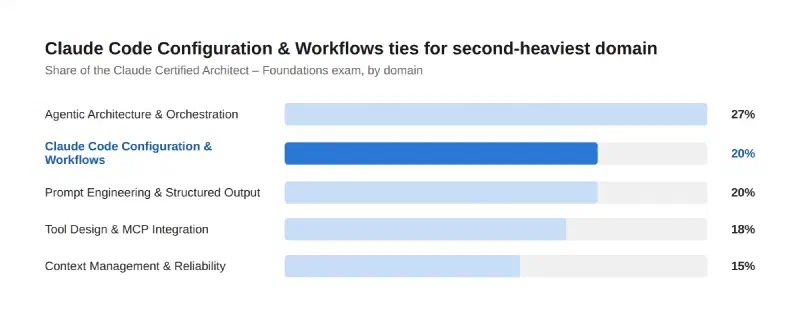
Domain 3 — Claude Code Configuration & Workflows — ties Prompt Engineering & Structured Output for second-heaviest domain on the Claude Certified Architect – Foundations exam, at 20%. Its six task areas are all about how you set up and drive Claude Code itself: configuration file hierarchy, custom commands and skills, conditional rules, choosing plan mode vs. diving straight in, iterating well, and wiring Claude Code into CI/CD.
Key point 1: CLAUDE.md has a hierarchy — know where each rule belongs#
Claude Code loads instructions from several scopes, broadest to narrowest: an organization-wide managed policy file (IT-controlled), a user-level ~/.claude/CLAUDE.md (your personal preferences across every project), project-level (./CLAUDE.md or ./.claude/CLAUDE.md, shared with the team via version control), and a gitignored CLAUDE.local.md for your own project-specific preferences that shouldn’t be committed. They load in that order, so a project instruction appears in context after a user instruction — put a rule at the scope where it actually belongs, not wherever’s convenient. For a large project, @path/to/file import syntax lets one CLAUDE.md pull in a README, a package.json, or a dedicated workflow guide without duplicating that content, with imports resolving relative to the file that references them and nesting up to four hops deep.
Key point 2: custom commands and skills — scoped, and with tool access you control#
Project-scoped commands live in .claude/commands/ (checked into version control, shared with the team) versus user-scoped commands in ~/.claude/commands/ (personal, not shared). Skills go further: a SKILL.md’s frontmatter can set context: fork to run the skill in an isolated subagent with no visibility into the main conversation’s history — useful for a self-contained task like a code review — and allowed-tools to pre-approve a specific, scoped set of tools for that invocation only (the grant clears after the next message), rather than the skill inheriting blanket tool access.
Key point 3: path-specific rules load only when they’re relevant#
Rather than stuffing every convention into one CLAUDE.md that loads on every single session regardless of what you’re touching, .claude/rules/ files can carry a paths field in their YAML frontmatter — a glob pattern like src/api/**/*.ts — so that rule only enters context when Claude is actually working with matching files. This keeps a big project’s conventions modular by topic (testing.md, security.md, api-design.md) and keeps context usage down, since a rule about API validation doesn’t need to be loaded while you’re editing a CSS file.
Key point 4: plan mode is for uncertainty and multi-file changes, not everything#
Plan mode — Claude reads and reasons without making changes, then proposes a plan you approve before it touches anything — is designed for complex, large-scale work: when you’re unsure of the right approach, the change spans multiple files, or you’re unfamiliar with the code being modified. For a simple, well-scoped change — a typo fix, a log line, a variable rename — plan mode is overhead you don’t need. The practical test: if you could describe the diff in one sentence, skip the plan and let Claude execute directly.
flowchart TD
    A[New task] --> B{Could you describe
the diff in one sentence?}
    B -->|Yes| C[Direct execution]
    B -->|No| D{Multi-file, unfamiliar code,
or unsure of approach?}
    D -->|Yes| E[Plan mode]
    D -->|No| C

    style C fill:#c9ddf6,stroke:#86b6ef,color:#0b0b0b
    style E fill:#2a78d6,stroke:#1c5cab,color:#fff
Key point 5: iterate with examples, tests, and an upfront interview — not vague feedback#
Three concrete techniques for progressive improvement, all about giving Claude something to check its own work against rather than “make it better”: providing input/output examples (“this input should produce that output”) instead of describing behavior abstractly; test-driven iteration, where Claude runs a real check — a test suite, a build, a screenshot comparison — and keeps iterating until it passes, rather than stopping the moment the work merely looks done; and the interview pattern for larger features, where you have Claude ask you about technical implementation, UI/UX, and edge cases before writing a spec and starting implementation, surfacing considerations you might not have thought to mention upfront.
A quick note on scale: CI/CD integration#
Rounding out the domain: Claude Code runs non-interactively with the -p (or --print) flag, which is what makes it usable inside a CI pipeline, a pre-commit hook, or any script rather than only an interactive terminal session. Pair it with --output-format json to get a structured response your pipeline can parse programmatically instead of scraping plain text — useful for anything from a typo linter run on every PR diff to a build-log summarizer that writes its findings to a file.
How much this matters#
Conclusion#
Domain 3 in one pass: CLAUDE.md has a real hierarchy — managed, user, project, local — and imports let you pull in reference material without duplicating it. Commands and skills scope by project vs. personal, and skills add context: fork and allowed-tools for isolation and controlled tool access. Path-specific rules keep large projects’ conventions modular without bloating every session’s context. Plan mode earns its overhead on uncertain, multi-file work and costs you nothing on a one-sentence diff. Iteration works best with examples, real checks, and an upfront interview for bigger features. And -p plus --output-format json is what turns Claude Code into a CI/CD citizen instead of a terminal-only tool.
Sources#
- Claude Certified Architect – Foundations Exam Guide — Domain 3 task statements
- How Claude remembers your project — Claude Code Docs — CLAUDE.md hierarchy, imports,
.claude/rules/ - Extend Claude with skills — Claude Code Docs —
context: fork,allowed-tools, command scoping - Best practices for Claude Code — Claude Code Docs — plan mode, verification, the interview pattern
- Run Claude Code programmatically — Claude Code Docs —
-p,--output-format json
The research and the technical accuracy check against the official docs are AI-assisted; the framing, the “what this means for the exam” judgment calls, and any war stories are mine.
Where this fits#
Part 4 of Becoming a Claude Architect, following Domain 2 — Tool Design & MCP Integration. Part 5 takes on Domain 4 — Prompt Engineering & Structured Output.