
What this is about#
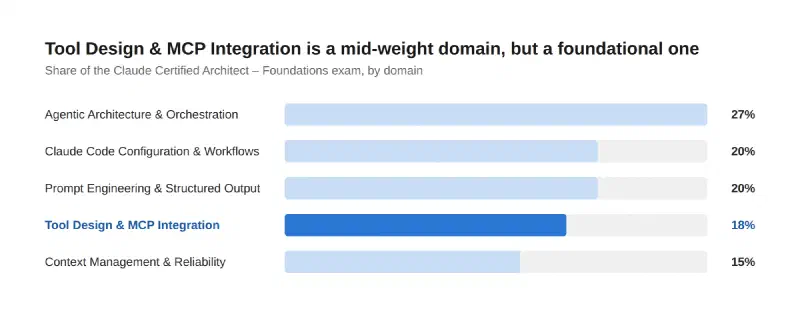
Domain 2 — Tool Design & MCP Integration — is 18% of the Claude Certified Architect – Foundations exam, across five task areas: designing tool interfaces, structuring error responses, distributing tools across agents, integrating MCP servers, and choosing built-in tools well. It’s a lighter domain than Agentic Architecture, but arguably the most immediately practical one — every point here shows up the first time you give an agent a tool that doesn’t work the way you expected.
Key point 1: the tool description is the selection mechanism#
An LLM doesn’t read your tool’s code before deciding to call it — it reads the description. That’s the entire basis for tool selection, which means a minimal description (“searches files”) is a liability the moment you have two tools that could plausibly match a request. The exam’s fix is specific: descriptions should include input formats, example queries, edge cases, and explicit boundaries — what the tool does and doesn’t cover. In practice this often means renaming tools to eliminate functional overlap, or splitting one generic tool into several purpose-specific ones with clearly defined contracts, rather than trying to write an ever-longer description for one tool that does too much.
Key point 2: structured errors let the agent recover, generic ones don’t#
When a tool call fails, “Operation failed” tells the model nothing it can act on. MCP’s actual mechanism distinguishes two layers: protocol errors (malformed request, unknown tool — returned as JSON-RPC errors, and less recoverable) versus tool execution errors (validation failures, business-logic errors, API failures — returned inside the tool result with isError: true, specifically so the model can self-correct and retry with adjusted parameters). The architect-level skill is going further than the flag alone: returning structured error metadata that categorizes the failure (transient, validation, business, permission) with a retryable flag, and distinguishing a genuine access failure from a valid-but-empty result — because those two should never look the same to the agent.
Key point 3: fewer tools per agent, chosen on purpose#
The exam guide states this almost as a rule of thumb: giving an agent access to too many tools — its example is 18 instead of 4-5 — degrades tool selection reliability. The fix isn’t fewer capabilities overall, it’s scoped access: give each subagent only the tools relevant to its role, and replace an overly generic tool with a more constrained, purpose-built alternative when one subagent keeps misusing it. Claude’s API gives you a second lever for the same problem: tool_choice. auto lets Claude decide whether to call a tool at all; any (or a forced tool choice naming one specifically) guarantees a tool gets used, which is the right call when you need a particular tool invoked first, before Claude reasons about anything else.
Key point 4: MCP servers are scoped for a reason — don’t default to the wrong one#
Claude Code separates MCP server configuration by scope: project-level (.mcp.json, checked into version control) is for shared team tooling everyone on the repo gets automatically, while user-level (~/.claude.json) is for personal or experimental servers you don’t want committed. Credentials go through environment variable expansion (${API_KEY}, with ${VAR:-default} fallback syntax) rather than hardcoded into the config file, which is what makes a .mcp.json safe to commit in the first place — the file has the shape of the config, not the secret. The other architect-level habit worth calling out: reach for an existing, well-maintained community MCP server before building a custom one, and expose read-heavy content (like a catalog or knowledge base) as MCP resources rather than wrapping it in a tool that just returns a blob of text.
Project scope (.mcp.json) | User scope (~/.claude.json) | |
|---|---|---|
| Loads in | Current project | All your projects |
| Shared with team | Yes, via version control | No |
| Typical use | Shared team tooling | Personal or experimental servers |
Key point 5: pick the right built-in tool for the job#
The exam also tests plain tool-selection judgment among Claude Code’s own built-ins. Grep is for content search — finding where a function is called across a codebase. Glob is for file path pattern matching — finding files by name or extension, not by what’s inside them. Read and Write handle whole-file operations; Edit is for a targeted, in-place modification rather than rewriting a file wholesale. Strung together well, these build up codebase understanding incrementally — Glob to find candidates, Grep to narrow by content, Read to confirm, Edit to change — rather than reaching for Read on every file in a directory out of caution.
flowchart TD
    A[What do you need to do?] --> B{Searching for something?}
    B -->|By file name / pattern| C[Glob]
    B -->|By file content| D[Grep]
    A --> E{Changing a file?}
    E -->|Small, targeted change| F[Edit]
    E -->|Full file read or rewrite| G[Read / Write]

    style C fill:#c9ddf6,stroke:#86b6ef,color:#0b0b0b
    style D fill:#c9ddf6,stroke:#86b6ef,color:#0b0b0b
    style F fill:#2a78d6,stroke:#1c5cab,color:#fff
    style G fill:#86b6ef,stroke:#5598e7,color:#0b0b0b
How much this matters#
Conclusion#
Domain 2 in one pass: the description is the interface — write it like the model is choosing blind, because it is. Structured errors with isError and a category/retryable flag let an agent recover instead of just failing. Fewer, well-scoped tools per agent beat a kitchen-sink tool list, and tool_choice gives you a second lever to guarantee the right one gets called. MCP servers split cleanly into project-shared and user-personal for a reason — respect the scoping. And the built-in tools reward picking deliberately: Grep for content, Glob for paths, Edit for small changes, Read/Write for whole files.
Sources#
- Claude Certified Architect – Foundations Exam Guide — Domain 2 task statements
- Tools — Model Context Protocol specification —
isError, protocol errors vs. tool execution errors - Implement tool use — Claude API Docs —
tool_choiceoptions - Connect Claude Code to tools via MCP — Claude Code Docs — project vs. user server scoping, environment variable expansion
The research and the technical accuracy check against the official docs are AI-assisted; the framing, the “what this means for the exam” judgment calls, and any war stories are mine.
Where this fits#
Part 3 of Becoming a Claude Architect, following Domain 1 — Agentic Architecture & Orchestration. Part 4 takes on Domain 3 — Claude Code Configuration & Workflows.